
TABLE OF CONTENTS
- Introduction
- How Data Access Restrictions work
- Segment Restrictions
- Division Restriction
- Hierarchy Restriction
- Combining restrictions
- Data Access Restrictions with SSO and User Groups
- Best practices
- Troubleshooting
- Related articles
Introduction
Data Access Restrictions allows CustomerGauge to control which survey records a user can access. This is commonly used to make sure users only see data that is relevant to their role, region, business unit, account responsibility, or management level. It can also help support privacy and security requirements by limiting access to records that a user should not be able to view.
Data Access Restrictions work automatically in the background. When a user opens reports or other supported areas of CustomerGauge, the platform checks whether each record matches the user’s access scope. If the record matches the user’s restrictions, the user can access it. If it does not match, the record is hidden from that user. Depending on your setup, some types of Data Access Restrictions may need to be configured by CustomerGauge Support, your Account Services Manager.
How Data Access Restrictions work
CustomerGauge compares the user’s access settings with the data on each record.
For example:
If a user is restricted to the Amsterdam division (without hierarchy), they can only access records with the "Amsterdam" division.
If a user is restricted to the Netherlands hierarchy level, they may be able to access records for the Netherlands and any divisions below it in the hierarchy.
If a user is restricted to the Enterprise customer segment, they can only access records that match that segment value.
If a user has both division and segment restrictions, the record must match both restrictions.
A user’s access scope can come from different places, depending on how your environment is configured:
The user’s individual access settings
A CustomerGauge User Group
SSO attributes sent by your Identity Provider
Existing/default settings, when no new value is provided
Segment Restrictions
Segment Restriction limits access based on one or more configured segment fields and values. Segments can be used to restrict access by criteria such as customer type, product, market, business line, account owner, or other values uploaded with your data.
Example:
User segment restriction: Customer Type = Enterprise
Record segment value: Enterprise
Result: access granted
If the same user tries to access a record where Customer Type = SMB, access is not granted because the segment value does not match. Segment Restriction can be used by itself, or together with Division or Hierarchy Restriction.
Segment access with SSO and User Groups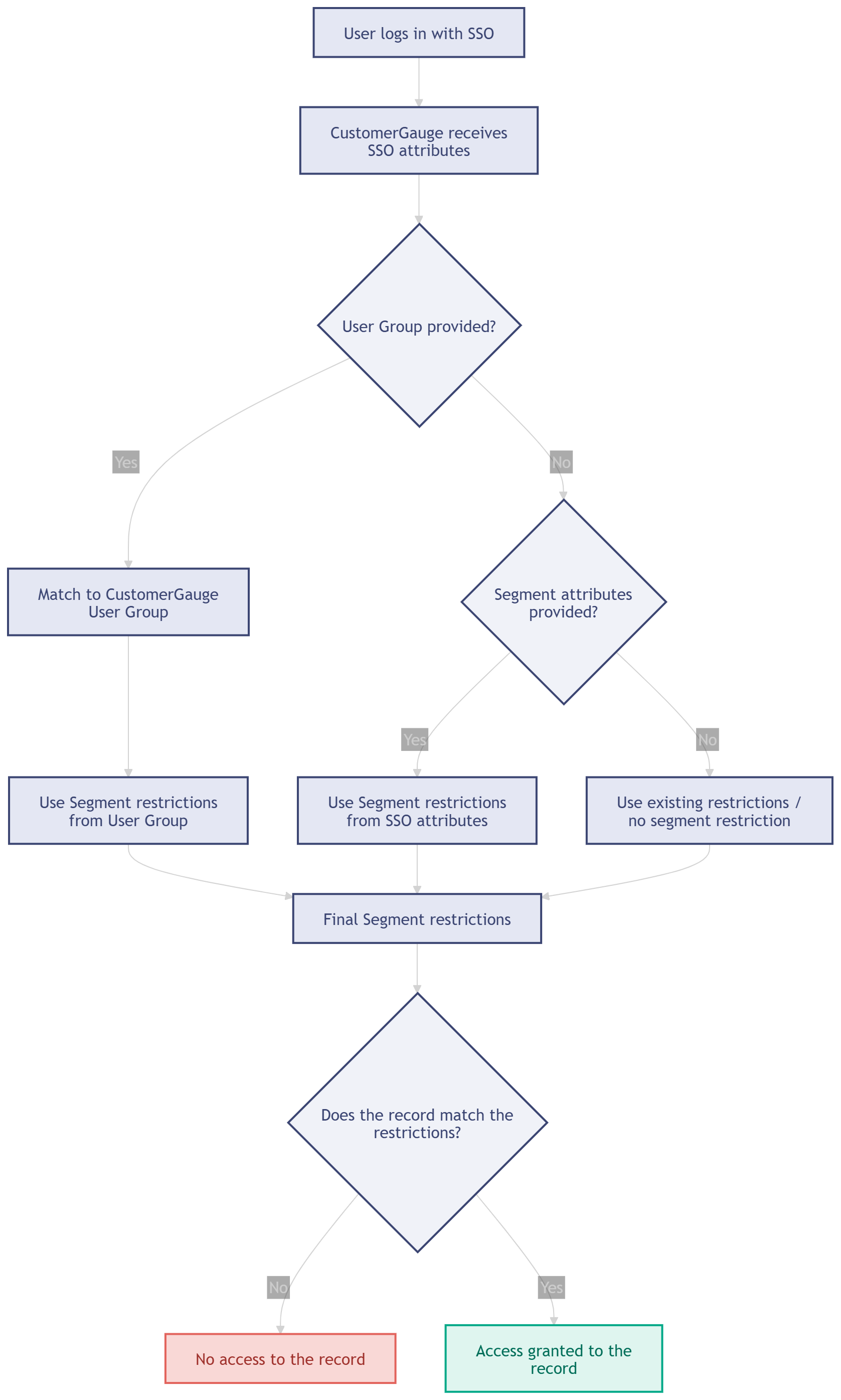
How CustomerGauge determines the final Segment restrictions when a user logs in with SSO.
When a user logs in with SSO:
CustomerGauge receives the SSO attributes.
If a User Group is provided, CustomerGauge matches the user to the corresponding CustomerGauge User Group.
If a matching User Group is used, the Segment restrictions come from the User Group.
If no User Group is provided, CustomerGauge checks whether Segment attributes were provided.
If Segment attributes were provided, CustomerGauge uses those Segment restrictions.
If no Segment attributes were provided, CustomerGauge uses the existing restrictions or applies no segment restriction, depending on the user’s configuration.
CustomerGauge checks whether the record matches the final Segment restrictions.
If the record matches, access is granted. If it does not match, access is denied.
Division Restriction
Division Restriction limits access based on the CustomerGauge Division field.
The Division field may be labelled differently in your system, depending on your configuration. It is often used for values such as country, region, business unit, location, or organization division. When a user has a division assigned to their user access, they can only access records that carry the same division value.
Example:
User division: Amsterdam
Record division: Amsterdam
Result: access granted
If the same user tries to access a record assigned to London, access is not granted because the division does not match. Users with Global division access are not restricted by division. They may still be able to use division as a report filter, if that filter is available in the report, but the filter is not automatically limiting what they are allowed to access.
Division / Hierarchy access with SSO and User Groups
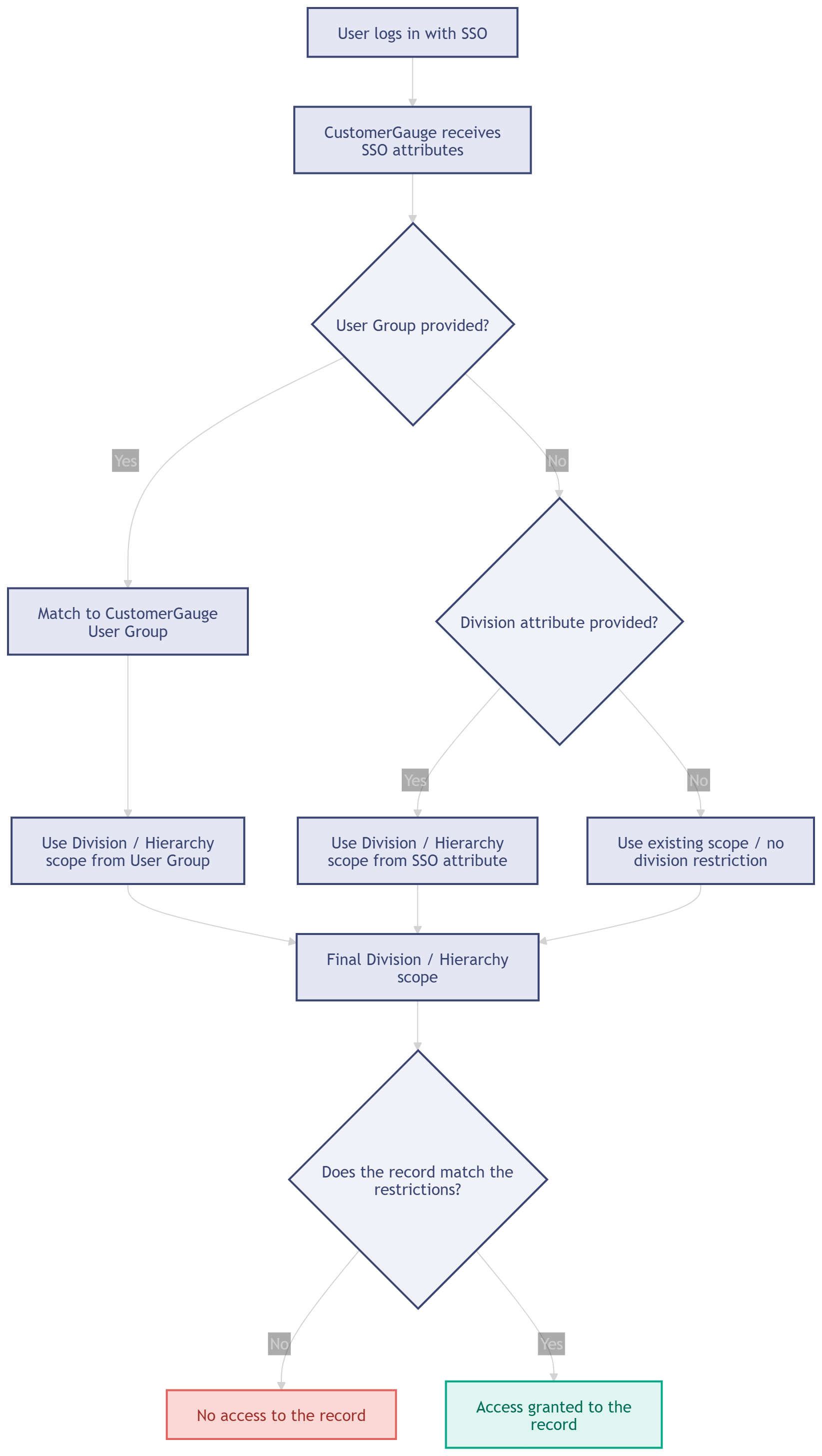
How CustomerGauge determines the final Division or Hierarchy scope when a user logs in with SSO.
When a user logs in with SSO:
CustomerGauge receives the SSO attributes.
If a User Group is provided, CustomerGauge matches the user to the corresponding CustomerGauge User Group.
If a matching User Group is used, the Division or Hierarchy scope comes from the User Group.
If no User Group is provided, CustomerGauge checks whether a Division attribute was provided.
If a Division attribute was provided, CustomerGauge uses that value.
If no Division attribute was provided, CustomerGauge uses the existing scope or applies no division restriction, depending on the user’s configuration.
CustomerGauge checks whether the record matches the final Division or Hierarchy scope.
If the record matches, access is granted. If it does not match, access is denied.
Hierarchy Restriction
Hierarchy Restriction builds on Division Restriction. Instead of treating each division as a separate value, hierarchy-based restriction arranges division values in a tree structure. Users higher in the hierarchy can access data from the levels below them.
Example hierarchy:
Global
Europe
Netherlands
Amsterdam
Utrecht
Rotterdam
United Kingdom
London
Glasgow
North America
USA
Boston
San Francisco
Canada
Quebec
Toronto
Example access:
A user assigned to Amsterdam can only access records tied to Amsterdam.
A user assigned to Netherlands can access records tied to Netherlands, Amsterdam, Utrecht, and Rotterdam.
A user assigned to Europe can access records tied to Europe and all divisions below Europe.
A user assigned to Global can access records across the full hierarchy.
Hierarchy Division Restriction is useful when managers or regional leaders need visibility into multiple teams, offices, countries, or business units beneath their own level. Users can only access, share, or assign items within the hierarchy scope available to them.
Combining restrictions
When multiple restrictions are active, they work together. A record must match all applicable restrictions before the user can access it.
| User has... | Record must match... |
|---|---|
| Division Restriction only | The user’s assigned division |
| Division Restriction with Hierarchy only | The user’s assigned hierarchy level or a level below it |
| Segment Restriction only | The user’s assigned segment value or values |
| Division + Segment Restriction | Both the division and the segment restriction |
| Division Hierarchy + Segment Restriction | Both the hierarchy scope and the segment restriction |
| No Division, Hierarchy, or Segment Restriction | No data access restrictions are applied for those fields; all records are accessible |
Example:
A user is assigned to:
Division: Netherlands
Segment (Customer Type): Enterprise
The user can only access records where:
Division is Netherlands
Segment (Customer Type) is Enterprise
If a record matches only one of those values, access is not granted.
Data Access Restrictions with SSO and User Groups
If your organization uses SSO, CustomerGauge can receive access-related attributes from your Identity Provider.
Depending on your setup, these attributes may define:
The user’s Role
The user’s Division or Hierarchy scope
The user’s Segment restrictions
The user’s User Group
When a User Group is provided through SSO, CustomerGauge uses the matching User Group as the source for access settings. This helps administrators manage access centrally and consistently. When no User Group is provided, CustomerGauge can use individual SSO attributes, such as Division or Segment values, if they are provided.
If neither a User Group nor a relevant SSO attribute is provided, CustomerGauge uses the user’s existing access settings or the default configuration for that user.
For more information about creating and managing User Groups, see the User Groups article.
Best practices
- Use User Groups when multiple users need the same Role, Division or Hierarchy scope, and Segment restrictions. This keeps access easier to manage and reduces manual updates.
- Use Segment Restriction when access should be limited by data values other than division, such as product line, account type, customer tier, or market.
- Keep naming consistent between your uploaded data, CustomerGauge configuration, and SSO attributes. Mismatched values can prevent users from accessing the correct records. Test new restrictions with a small number of users before rolling them out more broadly.
Troubleshooting
A user cannot see records they should have access to
Check the following:
Does the record have the expected Division value?
Does the user have the correct Division or Hierarchy scope?
If hierarchy is used, is the record within the user’s hierarchy branch?
Does the record match all required Segment restrictions?
If SSO is used, are the correct attributes being sent?
If User Groups are used, is the user matched to the correct User Group?
A user can see more records than expected
Check the following:
Does the user have Global or unrestricted division access?
Is the user assigned to a User Group with broader access than intended?
Are Segment restrictions missing or incomplete?
Are SSO attributes missing, causing CustomerGauge to keep existing or default access?
Is the hierarchy structure broader than expected?
User Group mapping is not working
Check the following:
Does the User Group identifier in CustomerGauge match the value sent by your Identity Provider?
Is the User Group included in the SSO attributes?
Is the user assigned to only the intended group?
Are the Role, Division or Hierarchy scope, and Segment restrictions configured correctly on the User Group?
If you are unsure which access restriction setup applies to your environment, contact CustomerGauge Support, your Account Services Manager.